
Table of Contents
SPACAR Light walkthrough example
This walkthrough given an example of the simulation of a parallel flexure guide.
Problem description
Let's consider a parallel flexure guide consisting of two parallel leafsprings and an intermediate rigid body. For this problem, we consider L=100mm and W=50mm. Furthermore, we consider steel leafsprings with a width of 50mm and a thickness of 0.5mm. The rigid intermediate body is made from aluminium and has a cross-section of 50x25mm. A schematic overview is given in the figure below.
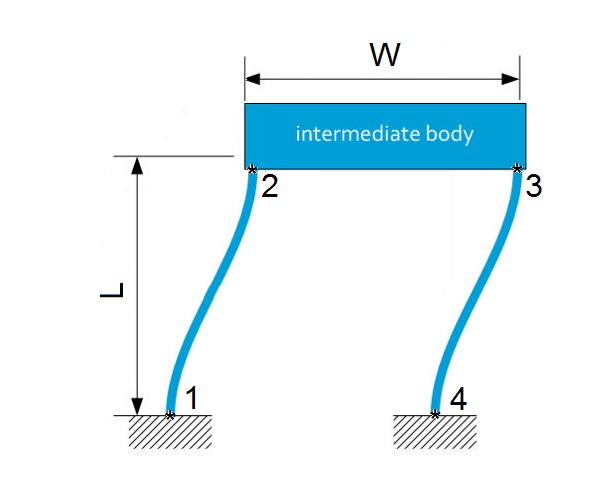
Figure: Parallel flexure guide (from janssenprecisionengineering.com)
Set up simulation
To set up the simulation, we first need to define the Node postions, Element connectivity, Node properties and the Element properties.
Node positions
We start by defining the positions of the nodes where we place the origin at node 1. nodes is an nn×3 matrix for defining the positions of the nodes. Each row represents a node (there are nn nodes). The row number determines the number a node gets. The first column contains the x-coordinate of the node position, the second column the y-coordinate, and the third column the z-coordinate.
clear   %clear workspace
clc     %clear command window

% addpath('spacar') %have this point to the folder where spacar is located

%some dimensions
L = 0.1;    %[m]
W = 0.05;   %[m]

%% NODE POSITIONS
nodes = [0 0 0;     %node 1
         0 L 0;     %node 2
         W L 0;     %node 3
         W 0 0];    %node 4
Element connectivity
Next the connectivity between elements is defined. Element connectivity is defined by an ne×2 matrix for defining elements. Each row represents an element (there are ne elements). The row number determines the number an element gets. Each element connects two nodes. The first column contains the number of the node that the element is connected to on one side, the second column the node number that the element is connected to on the other side.
%% ELEMENT CONNECTIVITY
elements= [1 2;     %leafspring between node 1 and 2
           2 3;     %intermediate body
           3 4];    %leafspring between node 3 and 4
Node properties
Node properties are defined by a structure array to assign properties to nodes, such as boundary conditions, applied loads, and inertia. The usage is nprops(i).field = value; to assign property field with value value to node i. For a full syntax list with all possible inputs, see SPACAR Light syntax.
First of all, node 1 and 4 are fixed:
%% NODE PROPERTIES
nprops(1).fix = true;       %fix node 1
nprops(4).fix = true;       %fix node 4
Furthermore, we would like for the parallel flexure guide to start 10mm deflected to the left and let it move 20mm to the right. For this purpose, we pre-describe the position of node 2 in x-direction:
nprops(2).displ_initial_x =-0.01; %start with node 2 displaced 10 mm to the left
nprops(2).displ_x =         0.02; %displace node 2 20 mm to the right
At last we apply a load of 5N in Z-direction on node 2 and 3
nprops(2).force_initial = [0 0 5]; %initial load of 5N in z-direction on node 2
nprops(3).force_initial = [0 0 5]; %initial load of 5N in z-direction on node 3
Element properties
Element properties are defined by a structure array for assigning properties to elements, such as dimensions, material constants, flexibility, and visual appearance. Properties are created in sets, such that the same set of properties can be assigned to multiple elements.
The usage is eprops(i).field = value; to assign property field with value value to set i. For a full syntax list with all possible inputs, see SPACAR Light syntax.
The first element property set is assigned to both leafsprings (element 1 and 3), selected material is steel, width = 50mm, thickness 0.5mm and torsional and out-of-plane bending deformations are considered flexible. Furthermore, two spacar-beams are used to model flexibility of the leafsprings.
%% ELEMENT PROPERTIES
%first element property set
eprops(1).elems = [1 3];        %assing property set 1 to elements 1 and 3
eprops(1).emod = 210e9;         %E-modulus [Pa]
eprops(1).smod = 70e9;          %shear modulus [Pa]
eprops(1).dens = 7800;          %density   [kg/m^3]
eprops(1).dim = [0.05 0.0005];  %cross-sectional dimension (width and thickness, resp.) [m]
eprops(1).cshape = 'rect';      %rectangular cross-sectional shape
eprops(1).flex = [2 3 4];       %flexible deformations: torsion (2) and out-of-plane bending (3,4)
eprops(1).orien = [0 0 1];      %width-direction of leafspring oriented in z-direction
eprops(1).color = [0.8549    0.8588    0.8667]; %color in rgb values between 0 and 1
The second element property set is assigned to the intermediate body (element 1 and 3), selected material is aluminium, width = 50mm and thickness = 50mm.
%second element property set
eprops(2).elems = [2];          %assing property set 2 to element 2
eprops(2).dens = 2700;          %density   [kg/m^3]
eprops(2).dim = [0.05 0.025];   %cross-sectional dimension (width and thickness, resp.) [m]
eprops(2).cshape = 'rect';      %rectangular cross-sectional shape
eprops(2).orien = [0 0 1];      %width-direction of leafspring oriented in z-direction
eprops(2).color = [0.1686    0.3922    0.6627]; %color in rgb values between 0 and 1
Run simulation
When all input seems complete, a call to spacarlight can be invoked:
out = spacarlight(nodes,elements,nprops,eprops);
If the model works, spacarlight automatically runs the static simulation and produces a visualization of the model.
Also, simulation results are stored in the MATLAB workspace in the structure out.
Example script
- example.m
clear
clc

% addpath('spacar') %have this point to the folder where spacar is located

%some dimensions
L = 0.1;    %[m]
W = 0.05;   %[m]

%% NODE POSITIONS
nodes = [0 0 0;     %node 1
         0 L 0;     %node 2
         W L 0;     %node 3
         W 0 0];    %node 4


%% ELEMENT CONNECTIVITY
elements= [1 2;     %leafspring between node 1 and 2
           2 3;     %intermediate body
           3 4];    %leafspring between node 3 and 4


 %% NODE PROPERTIES
nprops(1).fix = true;       %fix node 1
nprops(4).fix = true;       %fix node 4

nprops(2).displ_initial_x =-0.01; %start with node 2 displaced 10 mm to the left
nprops(2).displ_x =         0.02; %displace node 2 20 mm to the right

nprops(2).force_initial = [0 0 5]; %initial load of 5N in z-direction on node 2
nprops(3).force_initial = [0 0 5]; %initial load of 5N in z-direction on node 3


%% ELEMENT PROPERTIES
%first element property set
eprops(1).elems = [1 3];        %assing property set 1 to elements 1 and 3
eprops(1).emod = 210e9;         %E-modulus [Pa]
eprops(1).smod = 70e9;          %shear modulus [Pa]
eprops(1).dens = 7800;          %density   [kg/m^3]
eprops(1).dim = [0.05 0.0005];  %cross-sectional dimension (width and thickness, resp.) [m]
eprops(1).cshape = 'rect';      %rectangular cross-sectional shape
eprops(1).flex = [2 3 4];       %flexible deformations: torsion (2) and out-of-plane bending (3,4)
eprops(1).orien = [0 0 1];      %width-direction of leafspring oriented in z-direction
eprops(1).color = [0.8549    0.8588    0.8667]; %color in rgb values between 0 and 1

%second element property set
eprops(2).elems = [2];          %assing property set 2 to element 2
eprops(2).dens = 2700;          %density   [kg/m^3]
eprops(2).dim = [0.05 0.025];   %cross-sectional dimension (width and thickness, resp.) [m]
eprops(2).cshape = 'rect';      %rectangular cross-sectional shape
eprops(2).orien = [0 0 1];      %width-direction of leafspring oriented in z-direction
eprops(2).color = [0.1686    0.3922    0.6627]; %color in rgb values between 0 and 1


%% DO SIMULATION
out = spacarlight(nodes,elements,nprops,eprops);


